Program Transforms
Translate · Mirror · Rotate · Inch↔Metric — rewrite coordinates across the whole program.
A G-code editor with built-in backplot, canned-cycle aware. Made by a machinist.
Free beta through October 2026. After beta, Basic stays free; Pro features require a license.

No feature bloat, no configuration maze. Eight things, done well.
G-code syntax highlighting, find/replace, go-to-line. The editor you wish was in your CAM software.
See the toolpath as you write. Canvas rendering, no 3D plugin bloat.
Handles N1G20G53X0.Z-15. and spaced styles equally well.
G71 Type II, G72, G73 profiles, G76 threading, G81–G89 drills — parsed the way Fanuc intends, no phantom moves.
Set your machine's travel. Catch over-travel before you crash a fixture.
Live logic linting — feed before spindle, arc-radius errors, missing G20/G21, incomplete G71 cycles. The checking other editors charge for.
Reopen every file from your last job in one click.
Drop files from Explorer onto the window. Works the way you'd expect it to.
Three tools most machinists already know. Here's where Edit lands.
| This CNCGuy Edit Beta | Vs Other CNC editors | Vs Notepad++ | |
|---|---|---|---|
| Price | Free during beta | $695+ /seat | Free |
| Modern editor | Yes (Monaco) | Dated UI | Yes |
| Backplot | Yes (mill + lathe) | Yes | No |
| Machine-aware limits | Yes | Partial | No |
| Compact Fanuc syntax | Yes, tested | Yes | No, manual |
| Made by a machinist | Yes | No | N/A |
This is a focused v1. We haven't shipped: post-processor editing, DNC file transfer, advanced file comparison, or 4th-and-5th-axis visualization. Those are on the roadmap.
If you need those today, stay on your current tool — we'd rather you wait than be disappointed.
If you mostly want a clean editor plus backplot that opens fast and doesn't crash on real shop programs, the beta is for you.
The full editor, backplot simulation, Program Check, and cycle-time estimating are free — and stay free. Pro layers on the power-user toolkit.
Translate · Mirror · Rotate · Inch↔Metric — rewrite coordinates across the whole program.
Machine Settings · Manage Machines — per-machine travel, feeds, and saved profiles.
Insert, manage, import & export reusable G-code blocks.
Machining · Cost · Setup-Time — beyond the free cycle-time estimate.
More Pro tools in development — macro debugging, conversational wizards, and DNC. Also coming: CNCGuy Vault, a companion app for program library, revisions & FAI approval.
Planned: around $249 one-time — no subscription, ever. Final pricing at launch.
Installer is about 105 MB. Opens in under a second on a modern laptop.
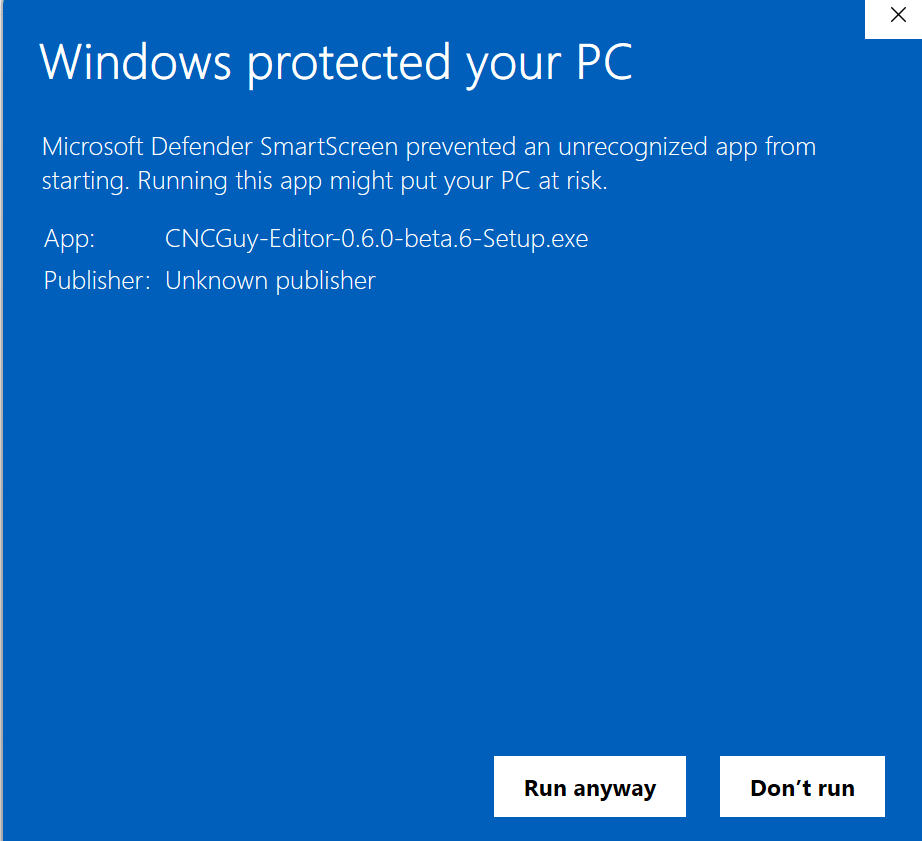
Download CNCGuy Edit →aaab1a5be105526674ca688cf8b2c0601440298519a79d2cbe3895745d5bda05 Get-FileHash .\CNCGuy-Editor-0.6.0-beta.14-Setup.exe CNCGuy Edit isn't code-signed yet, so Windows SmartScreen flags it as an Unknown publisher. It's a beta, not malware — code-signing lands with v1.1. Approve it once and Windows remembers your choice.
Running the installer opens "Windows protected your PC."
Click More info to expand it.
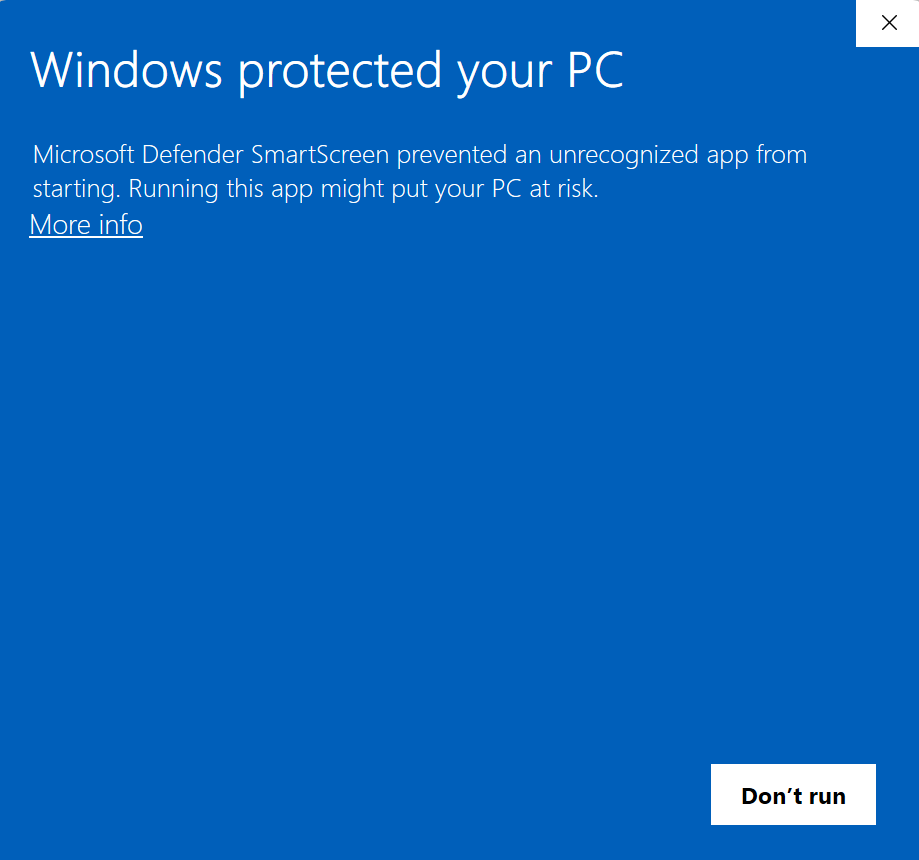
Confirm the app is CNCGuy-Editor-…-Setup.exe, then click
Run anyway. The installer starts normally.